You will learn how to create time-varying stimuli, and how to produce interleaved stimuli at frame rate.
1ST-ORDER DRIFTING GABOR
This lesson makes the basic orientation discrimination task more elaborate by presenting a 1st order drifting Gabor stimulus onto a 2D noise background.
First, duplicate the original experiment, rename the copy to Orientation Discrimination 5, move it to the top of the Designer table. Reveal its whole hierarchy (Option-click its arrow).
Step 1. Create a Drifting Stimulus
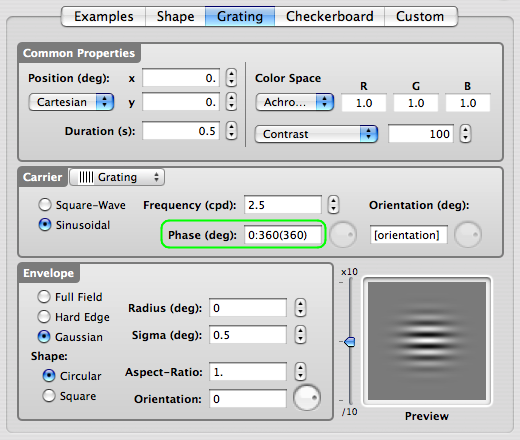
Rename the Gabor stimulus to Drifting Gabor. Edit the Drifting Gabor properties.
We are creating the drifting motion by specifying a time-varying spatial phase: enter 0:360(360) in the phase text field of the carrier as illustrated. This tells the phase to go from 0 to 360 deg (range defined by minimum and maximum values separated by ':' ) at a speed of 360 deg per second (speed defined between parentheses). This corresponds to a drifting speed of 1 cycle per second.
Click the OK button to validate the changes and return to the Designer panel.
Check & run the experiment now if you like to test it without the presence of noise background.
Tips: there are alternative ways to create a drifting Gabor using the Phase parameter:
- use explicitly the [TIME] variable: 360*[TIME] instead of 0:360(360) leads to the same smooth motion,
- use 0:4:270(0.125) for creating apparent motion: spatial phase jumps in a discrete manner through 4 steps, 0, 90, 180, 270 each presented for 0.125 second.
Step 2. Add a 2D Noise Stimulus
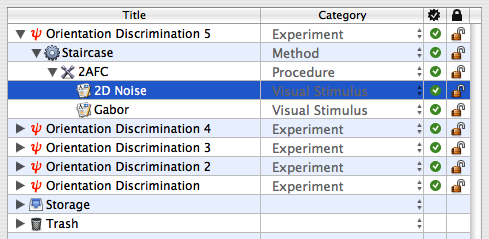
Similarly to what you've done in Orientation Discrimination Lesson 3, create a 2D noise stimulus with a radius of 2 deg. Name it 2D Noise and move it above the Gabor stimulus.
Step 3. Add a Dynamic Composing Event
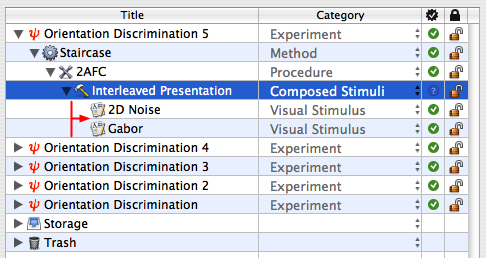
Select the 2AFC procedure, and insert a new group event using the '+' FOLDER icon. Set the name and category of this new event to Interleaved Presentation and Composed Stimuli, respectively.
Select the 2 stimuli 2D Noise and Gabor, and drag & drop them onto Interleaved Presentation, so they appear indented to the right.
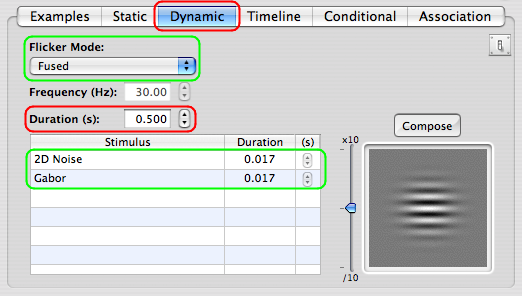
Edit the properties of the Interleaved Presentation event. Select the Dynamic tab.
Select the Fused option in the Flicker Mode popup menu, and set the overall Duration to 0.5 s.
The table presents the visual stimuli to be interleaved. Because of the selected Fused mode, their individual duration should correspond to the duration of a single display frame based of the display settings that applied to the currently edited Experiment event.
Note the Frequency text field that reflects the equivalent flickering frequency.
Click the OK button to validate the changes and return to the Designer panel.
Check & run the Experiment !
Conclusion
In this lesson, you learned how to create time-varying stimuli, and how to interleave stimuli at frame rate.
Fill free to add a comment, ask questions, suggest improvements, etc.
Latest Comments (1-25/26)
Comments:
I really liked this! Great job!
Thursday, September 02 2010 - 03:52 PM
Comments:
Hello. My name is Arlie.
I love you site.
Saturday, August 28 2010 - 07:11 PM
Comments:
Hello. My name is Abdiel.
I like you site.
_________$$$___________________$$$$___________
_________$$$$$________________$$$$$___________
_________$$$$$$______________$$$$$$___________
__________$$$$$$$___________$$$$$$$___________
____________$$$$$$$$_______$$$$$$$$___________
_____________$$$$$$$$$_____$$$$$$$____________
_______________$$$$$$$$____$$$$$$$____________
________________$$$$$$$$$__$$$$$$_____________
___________________$$$$$$$$$$$$$______________
______________________$$$$$$$$$_______________
_________________$$$$$$$$$$$$$________________
_______________$$$$$$$$$$$$$$$$_______________
______________$$$___$$$$$$$$$$$$______________
_____________$$$$$_$$$$$$$$$$$$$______________
____________$$$$$$$$$$$$$$$$$$$$______________
_____________$$$$$$$$$$$$$$$$$$$______________
______________$$$$$$$$$$$$$$$$$_______________
__________________$$$$$$$$$$$$$_______________
_________________$$$$$$$$$$$$_______
__________________
Saturday, August 28 2010 - 02:28 PM
Comments:
Hey. My name is Candelari .
I love you site.
Saturday, August 28 2010 - 10:37 AM
Comments:
Hello. My name is Akeem.
I love you site.
Saturday, August 28 2010 - 10:27 AM
Comments:
Hi. My name is Burdette .
I love you site.
Saturday, August 28 2010 - 10:19 AM
Comments:
Hi. My name is Brad .
I like you site.
Saturday, August 28 2010 - 10:09 AM
Comments:
Hello. My name is Carnell .
I like you site.
Saturday, August 28 2010 - 10:02 AM
Comments:
Hi. My name is Anton.
I love you site.
Saturday, August 28 2010 - 09:56 AM
Comments:
Hi. My name is Andres.
I love you site.
Saturday, August 28 2010 - 09:50 AM
Comments:
Hey. My name is Bernhard .
I like you site.
Saturday, August 28 2010 - 09:39 AM
Comments:
Hi. My name is Cary .
I like you site.
Saturday, August 28 2010 - 09:33 AM
Comments:
Hello. My name is Auston.
I love you site.
Saturday, August 28 2010 - 09:26 AM
Comments:
Hello. I alike you site
Friday, August 27 2010 - 05:52 PM
Comments:
I am new here and I was wondering if you could tell me why my account keeps logging out? Is this normal?
Friday, August 27 2010 - 02:50 AM
Comments:
I'm so happy to find this forum... Just wanted to drop by and say Hi and I'm looking forward to all the great discussion I will have with you guys!
Sunday, August 22 2010 - 01:16 AM
Comments:
hi i am new here just wana say hi to all members
Friday, August 20 2010 - 12:55 PM
Comments:
Rather interesting. Has few times re-read for this purpose to remember. Thanks for interesting article. Emmitt .
Wednesday, August 18 2010 - 03:07 PM
Comments:
Hello!
Check out
a marvelous search engine –
padding: 0.5em;
P.S. Yahoo – everything will be found! Google: nothing was really lost…
See you!
Wednesday, August 11 2010 - 05:56 AM
Comments:
Good day all,
I had been shared with I could leave some sort of message here in order to introduce myself.
I just signed up with the actual website and 'm trying to understand precisely how every little thing works.
My personal name is Rick Lawsons and am the mummy of two stunning small children.
I am married for nine years to Tom and with each other we tend to be very happy.
I hope to meet a lot of nice people who think likeminded.
Kindest Regards,
Ricky L,
Alias:Dagiatrorgift
Monday, August 02 2010 - 07:52 AM
Comments:
Hello!
I've recently found
a marvelous search engine –
P.S. Yahoo – everything will be found! Google: nothing was really lost…
Bye to everyone!
Sunday, August 01 2010 - 10:12 AM
Comments:
just wanted to say that this site is realy great and Im happy that i found it
I've gotten exposed to quite a lot of stuff here and just wanted to give my 2 cents. Im about to write a great article for this forum about
and I'll publish it as soon as i done it.
If anybody need some support about it, please MSG me.
Thank you.
btw: If you got problems with more things ,
you should read the article here:
It's a good thing. ;)
cheers
Thursday, July 22 2010 - 08:06 AM
Comments:
Whats up? New around here and figured that I should post and say hi.
Monday, May 31 2010 - 09:46 PM
Comments:
Good day!
Check out
a marvelous search engine –
baza sie pojebala
P.S. Yahoo – everything will be found! Google: nothing was really lost…
Bye to everyone!
Wednesday, May 26 2010 - 12:04 AM
Comments:
Good day!
Check out
an excellent search engine –
baza sie pojebala
P.S. Yahoo – everything will be found! Google: nothing was really lost…
Bye to everyone!
Saturday, May 22 2010 - 10:09 PM